Using Triggers
Decide how and when your scenarios start—on a schedule, webhook, or from another flow.
Triggers control when a scenario begins execution. Pick the trigger that matches your business event, then keep inputs predictable so downstream steps are easy to maintain.
Trigger types
Manual/Test
Run ad hoc to validate changes or replay a payload. Manual triggers let you run scenarios on demand with custom payloads. They’re essential for development, testing, and troubleshooting production issues.
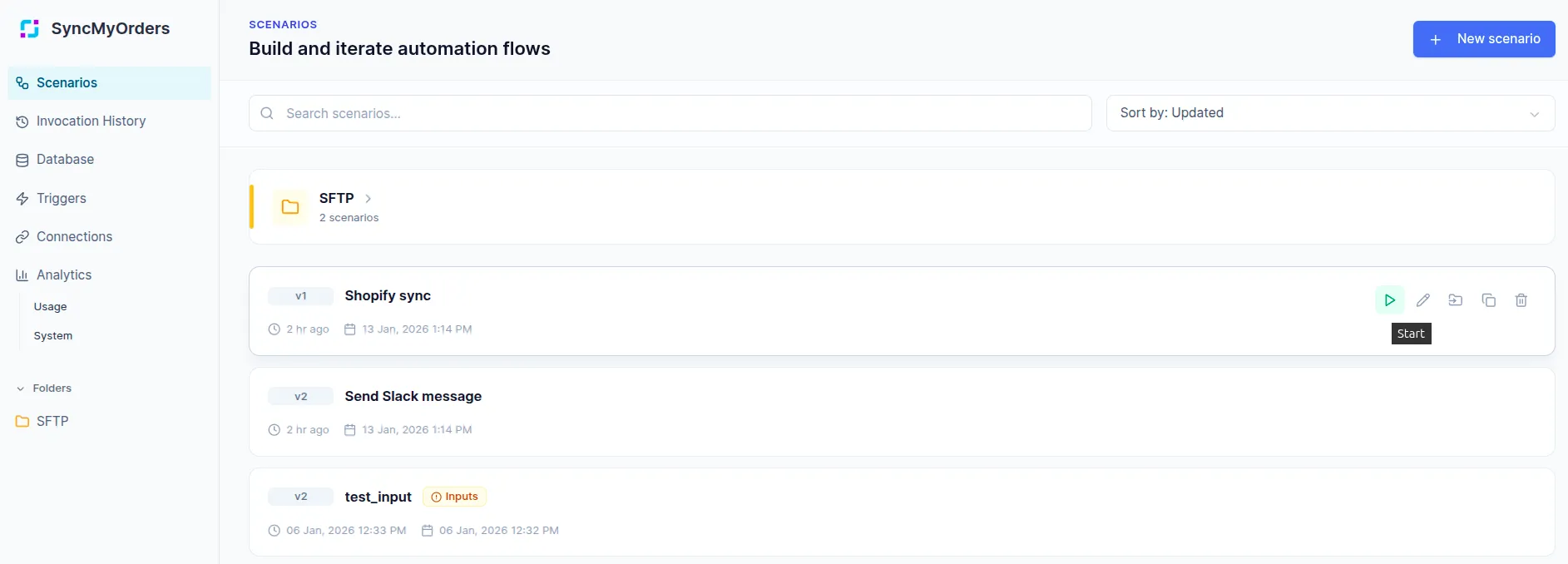
When to use manual triggers
- Development and testing: Validate scenario logic with sample data before connecting real triggers.
- One-off operations: Run bulk updates or migrations that don’t need automation.
- Troubleshooting: Replay failed invocations with the exact same payload to verify fixes.
- Demo and training: Show users how scenarios work without waiting for scheduled runs or webhook events.
Using manual triggers effectively
- Test with realistic data: Use actual payloads from your production systems (sanitized if needed) rather than simplified examples.
- Leverage invocation history: Copy input data from past runs and modify specific fields to test edge cases.
- Validate outputs: After manual runs, inspect the output data and step-by-step execution trace to ensure transformations work as expected.
- Iterate quickly: Make changes, test manually, review results, and refine - much faster than waiting for scheduled triggers.
Schedule (CRON)
Fire on a cadence (hourly, daily, weekly) for feeds, reconciliations, or audits. Scheduled triggers run your scenario automatically at fixed intervals. They’re perfect for batch operations, periodic syncs, and catch-up jobs that don’t need immediate execution.
When to use schedules
- Daily inventory syncs: Pull stock levels from your ERP every morning before orders start flowing.
- Bulk product updates: Refresh pricing, descriptions, or metadata across all channels on a weekly cadence.
- Incremental processing: Process large datasets in batches.
Common schedule patterns
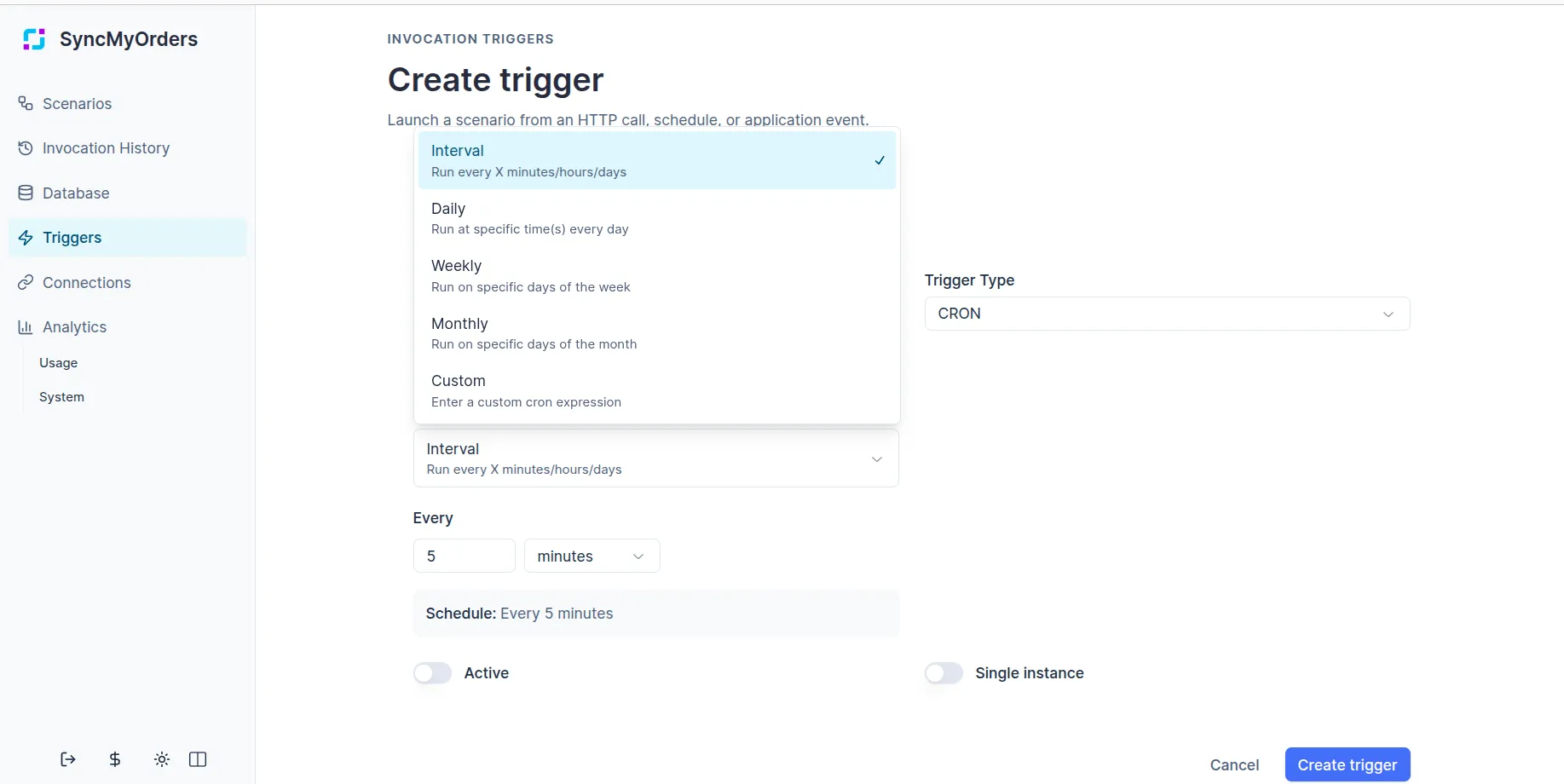
Example: Daily inventory sync
Use case: Every morning at 6 AM (UTC), fetch inventory counts from your warehouse management system, compare them against Shopify and marketplace listings, and flag discrepancies. The scenario logs differences to a object model and sends an email summary to your operations team.
Scenario flow:
- Fetch current inventory from WMS (HTTP agent).
- Query all active products from Shopify (Shopify agent).
- Compare counts using a Conditional step.
- Create discrepancy records for mismatches (Object Model agent).
- Send summary email if discrepancies found (HTTP agent to email service).
Webhook/API/HTTP
Start on inbound HTTP calls when marketplaces, ERPs, or custom apps send events. Webhook triggers accept HTTP POST requests and immediately start your scenario with the incoming payload. They’re ideal for real-time integrations where external systems need to notify SyncMyOrders about events as they happen.
When to use webhooks:
- Order notifications: When Shopify, WooCommerce, or marketplaces send new order events.
- Inventory updates: Real-time stock changes from warehouses or ERPs that need immediate propagation.
- Status changes: Fulfillment confirmations, shipment tracking updates, or return notifications.
- Custom integrations: Your own applications or third-party tools that can make HTTP calls.
Kick off processing when messages arrive at a designated address or inbox. They’re useful when partners or systems can only communicate via email, such as legacy ERPs, suppliers, or manual order submissions.
When to use email triggers
- Supplier order confirmations: Process purchase orders sent as email attachments (CSV, PDF, or structured text).
- Legacy system integration: When older systems can’t make HTTP calls but can send automated emails.
- Manual submissions: Allow team members to trigger workflows by sending formatted emails to a specific address.
- File-based workflows: Parse CSV or Excel files attached to emails and import them into your system.
Email trigger considerations
- Attachment size limits: Large files may need chunking or alternative delivery methods (SFTP instead of email).
- Spam filtering: Whitelist the trigger email address and configure filters to prevent legitimate messages from being blocked.
- Error handling: If an email format is unexpected, log the raw message for manual review rather than failing silently.
Setup checklist
- Decide the expected payload shape and document it in the scenario’s input schema.
- Add authentication or secret validation for webhook/API triggers.
- Set retry logic or idempotency keys if the source may send duplicates.
- Test with representative payloads before promoting the trigger to production.
Operating tips
- Keep triggers narrow — one trigger per scenario is easier to reason about than multiplexed handlers.
- Use schedules for bulk or catch-up work, webhooks for real-time updates, and email when partners cannot send webhooks.
- Log enough context (order IDs, channel references) at the entry step to speed up troubleshooting.
- Avoid overlapping runs - if a scheduled scenario might run longer than the interval, add a check at the start to skip if a previous run is still active.
- Time zone awareness - CRON expressions use UTC by default. Adjust for your business hours or use time zone offsets if your operations are region-specific.
- Schedule heavy operations (large file imports, bulk API calls) during off-peak hours to avoid impacting real-time order processing.