Step Types Overview
Learn about the core step types currently available in SyncMyOrders and when to use each one.
How to read this page
- Each step is a building block in a workflow. Use these descriptions to choose the right step for the job—no coding required.
- “Map data” means either pick a value that already exists (for example,
data.order.idorsteps.check_stock.outputs.available) or type a fixed value (text/number/yes-no). - Most flows start with Start and end with Finish; the rest route, repeat, or call into agents and subflows.
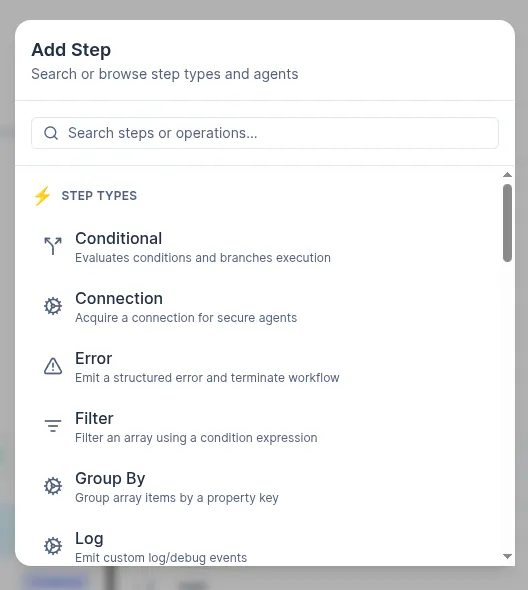
Conditional (if/then branch)
- What it does: Checks a condition and routes the flow based on true/false.
- How to use: Build the condition with operators like equals, contains, greater/less than, is empty, etc. Reference values (for example,
data.totalorsteps.lookup.outputs.status) or set literal values to compare against. - When to use: To skip, retry, or reroute when data meets certain criteria.
- Typical use cases: Stop if an order is missing a field, send VIP orders down a special path, or only call an API if stock is available.
Error
- What it does: Creates a controlled, user-generated business-process error inside the scenario.
- How to use: Place it on paths where you want to fail fast or produce a controlled error. Optionally include a message, code, or mapped details (for example, the failing item, response body, or validation result).
- When to use: When a situation is unrecoverable, or you want clear error output instead of silent failures.
- Typical use cases: handle business validation errors such as a negative value in
order qty, stop processing when an external API returns a hard error.
Filter
- What it does: Filters a list, keeping only the items that match a given condition.
- How to use: Point it at an array (for example,
data.itemsorsteps.fetch.outputs.orders) and configure rules that define which items to keep or remove. - When to use: When you have a collection but only some elements should be processed further.
- Typical use cases: Keep only in‑stock line items; filter orders by status or marketplace; remove items below a minimum price or quantity.
Group by
- What it does: Groups items in a list by one or more keys (such as channel, customer, or SKU) and produces grouped collections.
- How to use: Select the source array and configure the fields to group by. Each resulting group can be processed separately in downstream steps (often with
Splitor sub-scenarios). - When to use: When you need to aggregate or handle items together based on a shared attribute.
- Typical use cases: Group order lines by warehouse; group orders by marketplace or shipping method; group items by SKU to sum quantities.
Log
- What it does: Writes structured log entries to the scenario’s execution log.
- How to use: Add messages and map any context (for example, payload snippets, calculated values, or flags) that you want to appear in the logs.
- When to use: For debugging, observability, or documenting important checkpoints in the flow.
- Typical use cases: Log incoming payloads, intermediate calculations, or decisions taken at conditionals; trace why a particular branch was chosen; add breadcrumbs around complex loops.
Split (loop over a list)
- What it does: Repeats a subflow separately for every item in an array.
- How to use: Point it to the array (for example,
data.items), then build the subgraph of steps to run for each item. Choose sequential (one by one) or parallel, and whether to stop on first failure. - When to use: Whenever you need to perform the same logic for many items, one record at a time; when you need an additional action to every item in array.
- Typical use cases: For each line item, reserve inventory; for each product, normalize fields then upsert; for each record, call an external API.
Start Scenario (call another scenario)
- What it does: Embeds a versioned “child” scenario inside the current one, so you can safely reuse compiled logic and roll back to a previous working version if needed.
- How to use: Pick the child scenario and version, then map the parent data into the child’s inputs.
- When to use: To reuse shared logic (like “normalize customer data” or “post tracking updates”) across multiple flows.
- Typical use cases: Fan out to a dedicated subflow per channel, call a shared enrichment routine, or trigger a downstream integration you maintain separately.
Switch (multi-branch)
- What it does: Chooses one of many paths based on a value, similar to a multi-option router.
- How to use: Choose the value to inspect (for example,
data.channel,steps.get_order.outputs.status) and define one or more cases with match rules. Optionally define a default path. - When to use: When you have more than two possible outcomes and want a clear, maintainable alternative to many nested conditionals.
- Typical use cases: Route orders by channel or marketplace; branch on order status (new, canceled, shipped, etc.); apply different logic per country, currency, or error code.
Wait for Signal
- What it does: Pauses the scenario until a specific external signal or event is received.
- How to use: Configure the signal type and correlation key (for example, order ID or reference), and optionally a timeout and fallback behavior.
- When to use: When your flow must wait for something asynchronous to happen before continuing.
- Typical use cases: Pause until a manual approval is given; wait for a callback from a long‑running process.
While Loop
- What it does: Repeats a block of steps as long as a condition remains true.
- How to use: Define the loop condition using mapped values (for example, a counter, status, or flag) and design the inner steps that should run each iteration. Make sure that something inside the loop updates the condition so it eventually becomes false.
- When to use: When you need iterative behavior that is not tied to a fixed list, or when you must retry/refresh until a state changes.
- Typical use cases: Work with paginated product lists in Shopify; retry an operation a limited number of times.