Wait for Signal Step
Pause a scenario until a manual action is done; event or callback arrives.
What it does
- Suspends scenario execution until a human provides input.
- Validates that input against the Response Schema you configure.
- Returns a structured output object you can use in later steps (for example,
steps.wait_for_signal.outputs).
When to use it
- When a manual approval/ reviews are needed (approve, reject, request changes).
- When part of your process is asynchronous and controlled by an external system or person (for example, warehouse confirmation, payment provider callback, marketplace webhook).
- When you want to avoid polling an external system in a loop and instead react to a single, authoritative event.
- When you need to model long‑running business workflows with explicit “waiting” states (for example, “waiting for customer response”, “waiting for fulfillment creation”, “waiting for manual review”).
How to configure
-
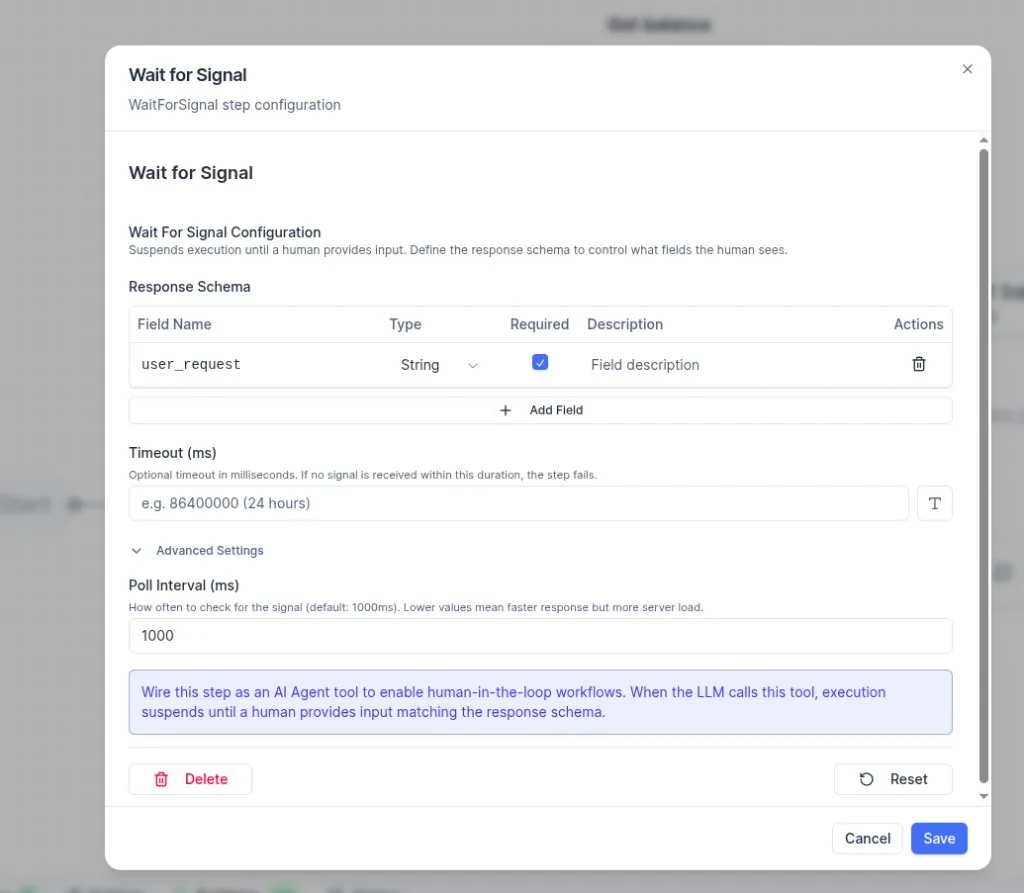
Response Schema
- Defines what fields the human must submit before the scenario can continue.
- Use Add Field to add one or more fields. Each field has:
- Field Name: the key in the output object (for example,
user_request). - Type: the expected data type (for example,
String). - Required: whether the field must be provided.
- Description: helper text shown to the human.
- Actions: remove a field.
- Field Name: the key in the output object (for example,
-
Timeout (ms) (optional)
- Maximum time to wait for a response, in milliseconds.
- If no response is received within this duration, the step fails.
- Example:
86400000(24 hours).
-
Advanced Settings → Poll Interval (ms)
- How often the system checks for the response (default:
1000ms). - Lower values can make the response appear faster, but increase server load.
- How often the system checks for the response (default:
Using it with AI Agents
You can wire this step as an AI Agent tool to enable human-in-the-loop workflows. When the LLM calls the tool, execution suspends until a human provides input that matches the response schema.
Business‑logic considerations
-
Idempotency and duplicates
- External systems may send the same signal more than once; design your flows so that only the first matching signal resumes the waiting instance. Later duplicates are either ignored or logged, not re‑processing the business action.
-
Timeout vs. business escalation
- Timeouts should represent a real business decision point, not just a technical default.
- For example: “If warehouse has not confirmed within 24h, release reserved stock and notify support” rather than silently continuing.
-
Where not to use it
- Do not use Wait for Signal for short, purely technical delays (like “sleep 5 seconds”) or for steps that can complete synchronously via API.
- Prefer it when the pause represents a meaningful state in the business process that stakeholders care about.
Typical patterns
-
Approval flows
- Scenario creates a draft action (refund, cancellation, bulk price change), sends a task to an approval system, then uses Wait for Signal until
approved/rejectedarrives. - Downstream branches apply different business rules based on the signal payload.
- Scenario creates a draft action (refund, cancellation, bulk price change), sends a task to an approval system, then uses Wait for Signal until
-
Reservation and fulfillment
- Reserve stock in WMS/ERP, then Wait for Signal confirming success/failure before updating marketplace stock or order status.
- On timeout, automatically roll back or re‑route orders to another warehouse.
-
Async payment and invoicing
- Initiate payment, then Wait for Signal from the PSP summarizing the outcome.
- Proceed to invoice and ship only after a positive signal; on failure or timeout, notify finance or reverse provisional actions.
-
External long‑running jobs
- Start an export, sync, or reconciliation job in an external system, store its job ID, then Wait for Signal with that job ID.
- When the job finishes, the signal resumes the scenario, which continues with post‑processing or reporting.